How to add a data logger to the app.【SOLARMAN Smart】

How to add a data logger to the app.【SOLARMAN Smart】

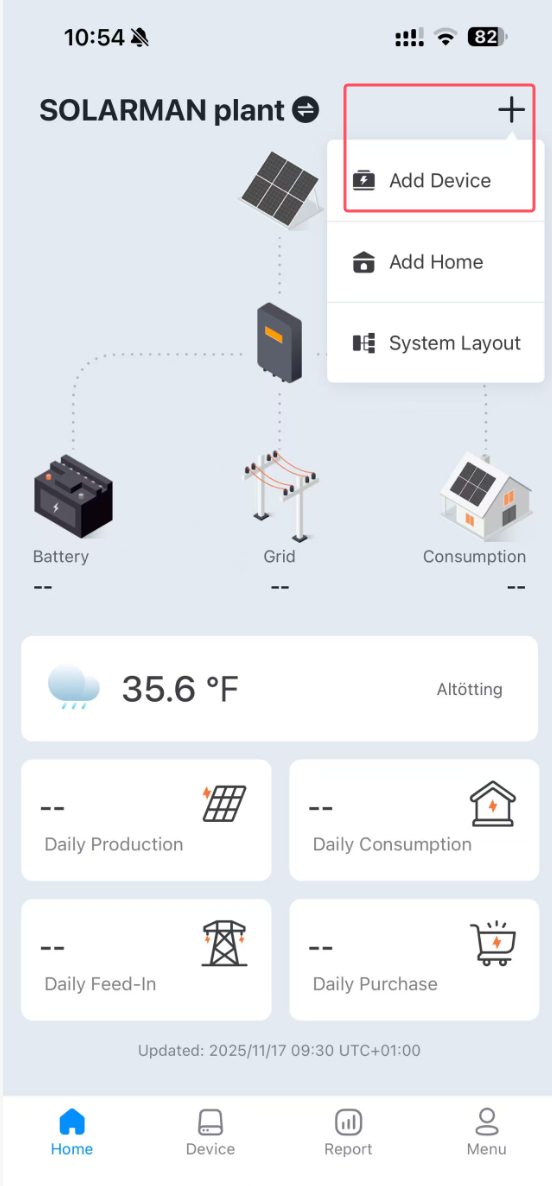
If the plant has already been created, click “Add Device” in the upper-right corner of the Home screen to proceed.
You can also view the operation manual under “About SOLARMAN smart” in the menu bar.
    • Related Articles

    • LS4G-6-G Data Logger After-Sales Troubleshooting SOP

      Scenario 1: Device Offline in 4G Mode 1. Check Hardware Connections 1.1 Ensure the 4G antenna is installed and securely fastened. 1.2 Open the SIM card slot to make sure the card is inserted in the correct direction with good contact. 2. Check SIM ...
    • Add a Logger【SOLARMAN Smart APP】

      After the home is created, you can add a logger. Logger can collect running data from PV devices and upload to server, which enables a full understanding of PV plant running status and revenue information. Furthermore, SOLARMAN Smart will determine ...
    • Add Logger【SOLARMAN Business Web】

      Add Logger【SOLARMAN Business Web】 1. In Monitoring > Plants, Click the plant where you want to add a logger 2. Click Add > Add New Gateway/Logger in the upper-right corner of the plant 3. Click Add > Enter the logger's SN to complete the additio ...
    • P1 Meter Reader Connection and Use FAQ

      Q1: How can I determine if my meter is compatible? A1: There are two ways to determine: Method 1: Check if the meter has a "P1/RJ12" interface. Method 2: Check the table below: https://www.solarmanpv.com/is-my-smart-meter-compatible Q2: What are the ...
    • Why there is no data on my APP【SOLARMAN Smart and Business】

      If the logger or inverter are offline, there will be no data in the plant. Your logger is offline.Please plug and unplug the logger again and ensure that your inverter communication address is 1. If it is not working, please press and hold the reset ...