Account Cancellation【SOLARMAN Smart APP】

Account Cancellation【SOLARMAN Smart APP】

Step 1: Go to「Account Cancellation」Page

「Menu」-「Account」-「Delete my Account」

Step 2: Read Account Cancellation Reminder

Please read the following instructions carefully before you apply for cancellation of your account.

  1. Please back up your data (e.g. Production Data, Grid-tied Data, SN and etc,) in advance to avoid unnecessary losses.
  2. Your home data (e.g. Production Data, Grid-tied Data, SN and etc,) will be erased permanently after your account is cancelled, which is unable to recover.
  3. Your personal data will be erased permanently after your account is cancelled, which is unable to recover.
  4. The connections between the account and business units will be erased permanently after your account is cancelled, which is unable to recover. And the business unit will not be able to use this software.
  5. All data will be erased permanently after your account is cancelled, which is unable to recover.
  6. You can create a new account after this account is cancelled.


Click "Confirm Cancellation" to continue.

Notice: Account that has data on SOLARMAN Business can't be cancelled from SOLARMAN Smart.

Step 3: Phone Number/E-mail Verification

If your account has bound to phone number or E-mail, phone number/E-mail verification will be required.

You can select either method for verification.
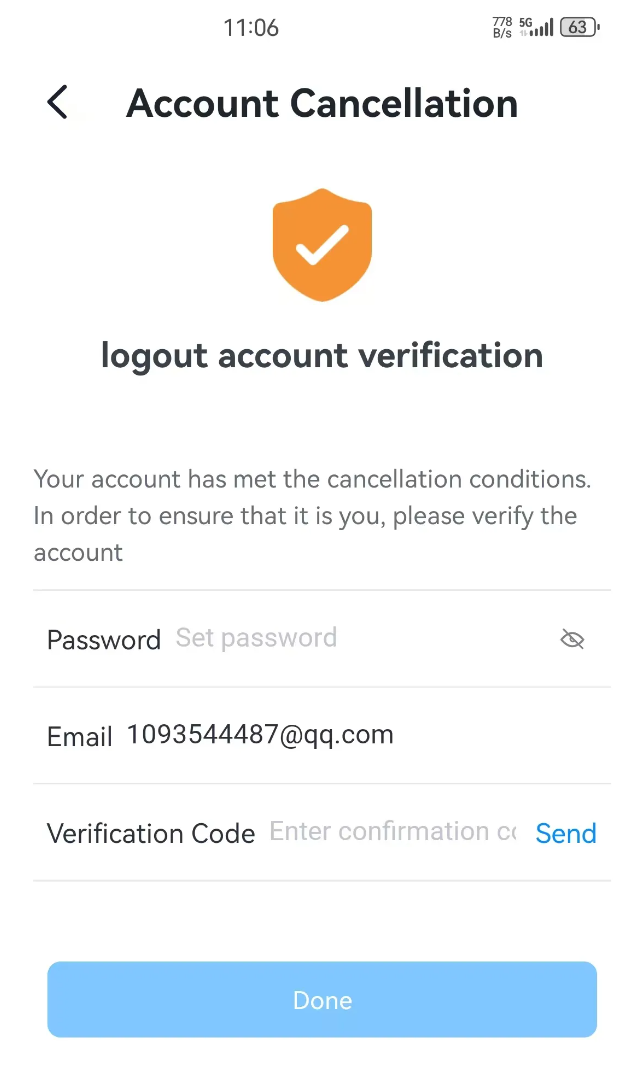
Step 4: Complete Account Cancellation

Click "Done",Complete Account Cancellation

    • Related Articles

    • Account Cancellation【SOLARMAN Business】

      Web Click the profile icon in the top-right corner to access your personal settings page. On this page, select “Deactivate Account” to proceed. App ME > Settings > Account & Security > Account Cancellation
    • Registration & Login【SOLARMAN Smart APP】

      1. Registration After entering SOLARMAN Smart App,please register at SOLARMAN Smart App to ensure the normal function. Click "Register" to continue. System supports E-mail registration currently. Please follow: 1) Set login account. (E-mail are ...
    • Languages【SOLARMAN Smart APP】

      SOLARMAN Smart supports 15 languages for now, which are 简体中文, English, 日本語,Deutsch,Português,Españo,Nederlands,Polski,Français,한국어,Tiếng Việt,Swedish,Italiano,Slovenščina,Čeština When you first log in to SOLARMAN Smart App, system will match the ...
    • Account Binding【SOLARMAN Smart APP】

      Go to 「Menu」-「Account」-「Profile」 to bind your account with your main contact way. You can log in via your main contact way after the binding is done. Some functions (e.g. send alerts to E-mail) are available for you after the binding is done. Binding ...
    • I have deleted my Internal member account; why am I unable to create a new Internal member account?【SOLARMAN Smart】

      An Internal member account, when registered as a Merchant Account, simultaneously generates a SOLARMAN Smart Account with identical login credentials. After deleting the Internal member account, the corresponding SOLARMAN Smart Account must also be ...